Best Laptop Buying Guide for Students in 2026: Avoid These Costly Mistakes Before Spending Your Money
Planning to buy a laptop in 2026? Learn which specs matter, mistakes students make, budget recommendations, and how to avoid wasting money.

Many students spend ₹40,000–₹80,000 on a laptop and realize after a few months that they bought the wrong one.
Some buy gaming laptops because they look powerful. Later they discover that carrying a 2.5kg laptop to college every day feels like carrying a small brick.
Others choose a laptop with only 4GB RAM because it is cheaper. A few months later, opening Chrome, VS Code, online meetings, and study applications together becomes frustrating.
A laptop is not just another purchase. For students, it often becomes a study partner for the next 3–5 years.
If you choose carefully today, you can save money and avoid future problems later.
In this guide you'll learn:
Which laptop specifications actually matter
What students commonly regret after buying
Best laptops according to use case
Budget recommendations
Money-saving tips
Hidden things many people forget
Mistake #1: Buying only because of processor names
Many students believe:
"Core i7 automatically means better performance."
That is not always true.
For example:
A newer Intel Core i5 processor can sometimes perform better than an older generation Core i7 processor.
Instead of only checking processor names, also check:
Processor generation
Real-world performance
Battery efficiency
Benchmarks
User reviews
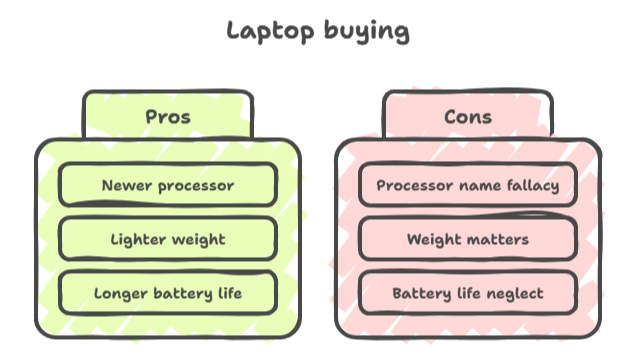
A laptop with a newer processor usually provides better speed and battery optimization.
Mistake #2: Ignoring laptop weight
Laptop weight may look like a small thing during purchase, but it matters later.
Imagine carrying:
Laptop = 2.4kg
Charger = 500g
Books = 2kg
Water bottle = 1kg
Suddenly your bag becomes much heavier.
Recommended laptop weights:
School students: under 1.4kg
College students: under 1.7kg
Gaming laptops: generally above 2kg
If you travel daily, lighter laptops become much more comfortable.
Mistake #3: Ignoring battery life
Many students focus only on RAM and processors.
Battery life becomes important during:
College lectures
Libraries
Travel
Online classes
Group projects
Recommended battery life:
Minimum: 6 hours
Better: 8–10 hours
Excellent: 10+ hours
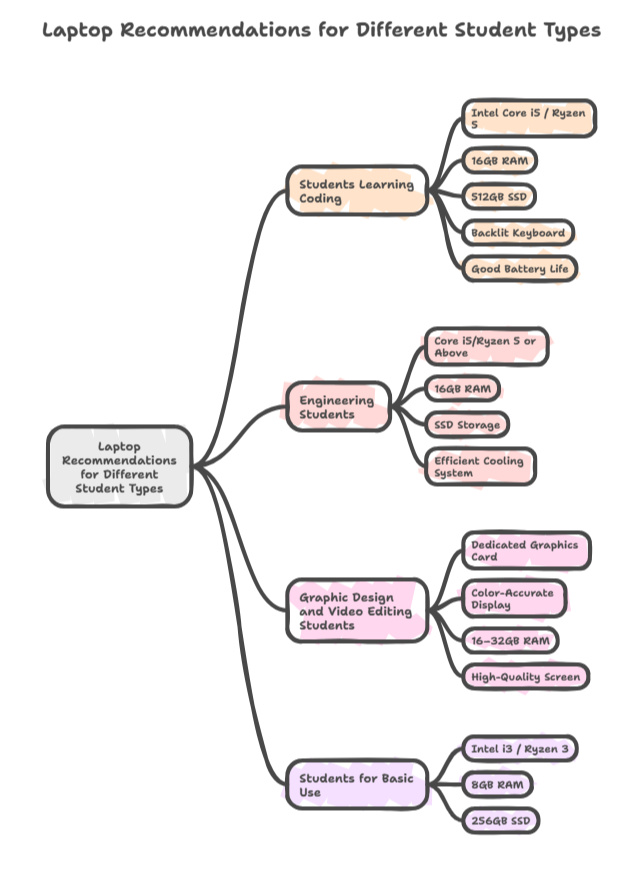
Real recommendations according to student type
Students learning coding
Recommended:
Intel Core i5 / Ryzen 5
16GB RAM
512GB SSD
Backlit keyboard
Good battery life
Avoid:
❌ Expensive graphics cards if unnecessary
Reason:
You save money and improve battery performance.
Engineering students
Recommended:
Core i5/Ryzen 5 or above
16GB RAM
SSD storage
Efficient cooling system
Useful software:
MATLAB
AutoCAD
VS Code
Simulation software
Graphic design and video editing students
Recommended:
Dedicated graphics card
Color-accurate display
16–32GB RAM
High-quality screen
Useful software:
Adobe Photoshop
Premiere Pro
Blender
After Effects
Students for basic use
Recommended:
Intel i3 / Ryzen 3
8GB RAM
256GB SSD
Suitable for:
Online classes
Web browsing
Notes
Assignments
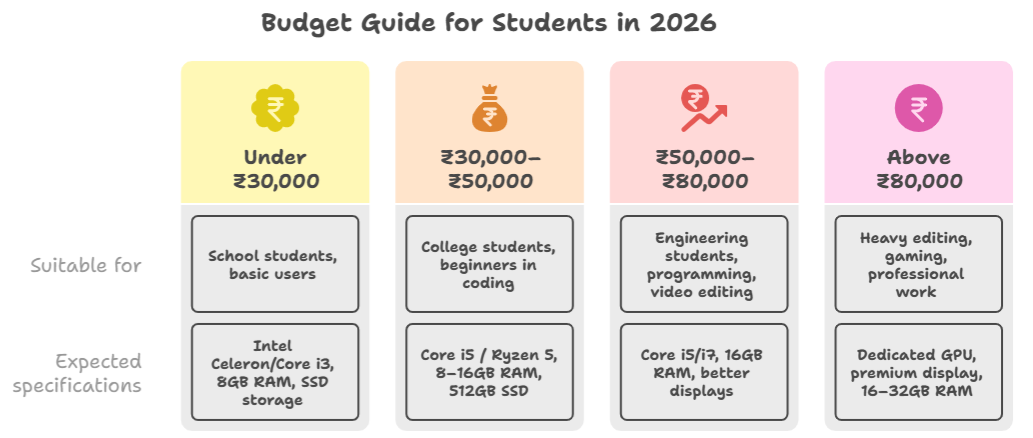
Budget guide for students in 2026
Under ₹30,000
Suitable for:
School students
Basic users
Expected specifications:
Intel Celeron/Core i3
8GB RAM
SSD storage
₹30,000–₹50,000
Suitable for:
College students
Beginners in coding
Expected specifications:
Core i5 / Ryzen 5
8–16GB RAM
512GB SSD
₹50,000–₹80,000
Suitable for:
Engineering students
Programming
Video editing
Expected specifications:
Core i5/i7
16GB RAM
Better displays
Above ₹80,000
Suitable for:
Heavy editing
Gaming
Professional work
Expected specifications:
Dedicated GPU
Premium display
16–32GB RAM
Laptop buying checklist before clicking "Buy"
Is RAM upgradeable?
Is SSD available?
Is weight below 1.7kg?
Is battery backup above 6 hours?
Is there a nearby service center?
Is a student discount available?
Is warranty extension available?
Is keyboard quality comfortable?
Does it include enough ports?
Hidden costs students often forget
Many people only calculate laptop price.
Actual spending may also include:
Laptop bag
Mouse
External SSD
Antivirus
Extended warranty
USB hub
Headphones
Laptop stand
A ₹50,000 laptop can easily become ₹58,000–₹60,000 after additional purchases.
Tips to save money while buying a laptop
Buy during festival sales
Check student discounts
Compare prices on multiple websites
Look for bank offers
Consider certified refurbished laptops
Check no-cost EMI options
Trusted Platforms to Buy Laptops in India
Buying from trusted sellers can help you avoid fake products, warranty problems, or pricing issues. Before purchasing, always compare prices, check seller ratings, warranty details, and available offers.
Amazon India
Large selection of laptops, frequent discounts, exchange offers, and student-friendly EMI options.Flipkart
Popular for festival sales, bank offers, and no-cost EMI options.Croma
Useful if you want both online ordering and physical store support.Reliance Digital
Provides laptop deals, exchange offers, and offline service availability.Apple Education Store India
Students can often receive education discounts on MacBooks and accessories.Dell India Official Store
Useful for customization, warranty plans, and student offers.HP India Official Store
Provides direct purchase options and warranty support.Lenovo India Official Store
Often includes student discounts and customizable laptop configurations.
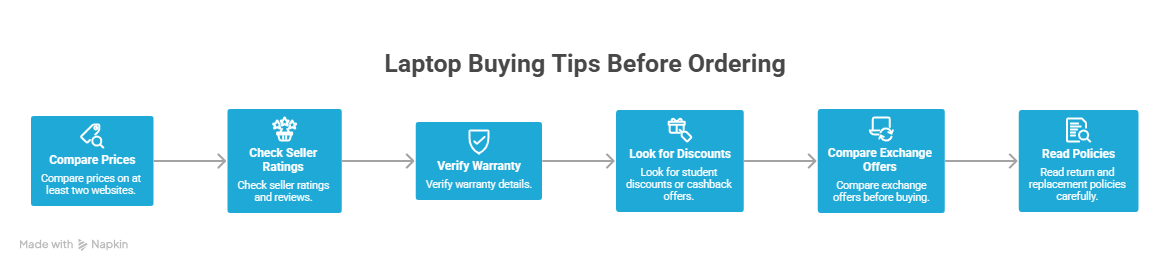
Tips before ordering from any platform
Compare prices on at least two websites
Check seller ratings and reviews
Verify warranty details
Look for student discounts or cashback offers
Compare exchange offers before buying
Read return and replacement policies carefully
Sometimes a laptop that costs ₹55,000 on one website may be available for ₹49,999 with bank offers or student discounts on another platform.
Frequently Asked Questions (FAQ)
Is 8GB RAM enough for students in 2026?
For basic use such as browsing, notes, and assignments, 8GB is enough. For coding and long-term use, 16GB is a better option.
Which processor is better: Intel or AMD?
Both Intel and AMD offer good performance. Compare laptop reviews, battery life, and pricing before choosing.
Should students buy gaming laptops?
Gaming laptops are useful if you need heavy software, editing, or gaming performance. For regular students they may be heavier and provide lower battery life.
Is a MacBook worth buying for students?
MacBooks provide excellent battery life and strong performance. However, they are expensive and may not fit every budget.
How long should a student laptop last?
A good laptop should easily last around 4–5 years with proper care.
Should students buy 256GB or 512GB storage?
512GB SSD is generally the safer option because files, software, and projects increase over time.
Final advice
Do not buy a laptop because YouTubers call it "beast", "killer", or "ultimate."
Buy according to:
Your course
Software requirements
Future plans
Budget
The best laptop is not the most expensive laptop.
The best laptop is the one that solves your problems.
Written by
Jayesh Gavit
IT Engineer & Content Creator, JGblogs
IT engineer with a passion for technology and building things. Started JGblogs in 2026 to share information and make government schemes, jobs, and career guides accessible to every Indian — free, in their own language.
About the author →Article
Recommended Products
Related articles
GPT-6 Astra: Everything You Need to Know About OpenAI’s New AI Model
6 September 2026·1,250 views
Adivasi Divas 2026: History, Tribal Culture, Languages, Maharashtra & Wishes
9 August 2026·1,250 views