2026 मध्ये विद्यार्थ्यांसाठी सर्वोत्तम मोफत AI tools — संपूर्ण मार्गदर्शिका
2026 मध्ये विद्यार्थ्यांसाठी best free AI tools — NotebookLM, ChatGPT, Gemini, Perplexity, Grammarly, Canva AI. काय करतात, कुठे वापरावे, कुठून सुरुवात करावी.
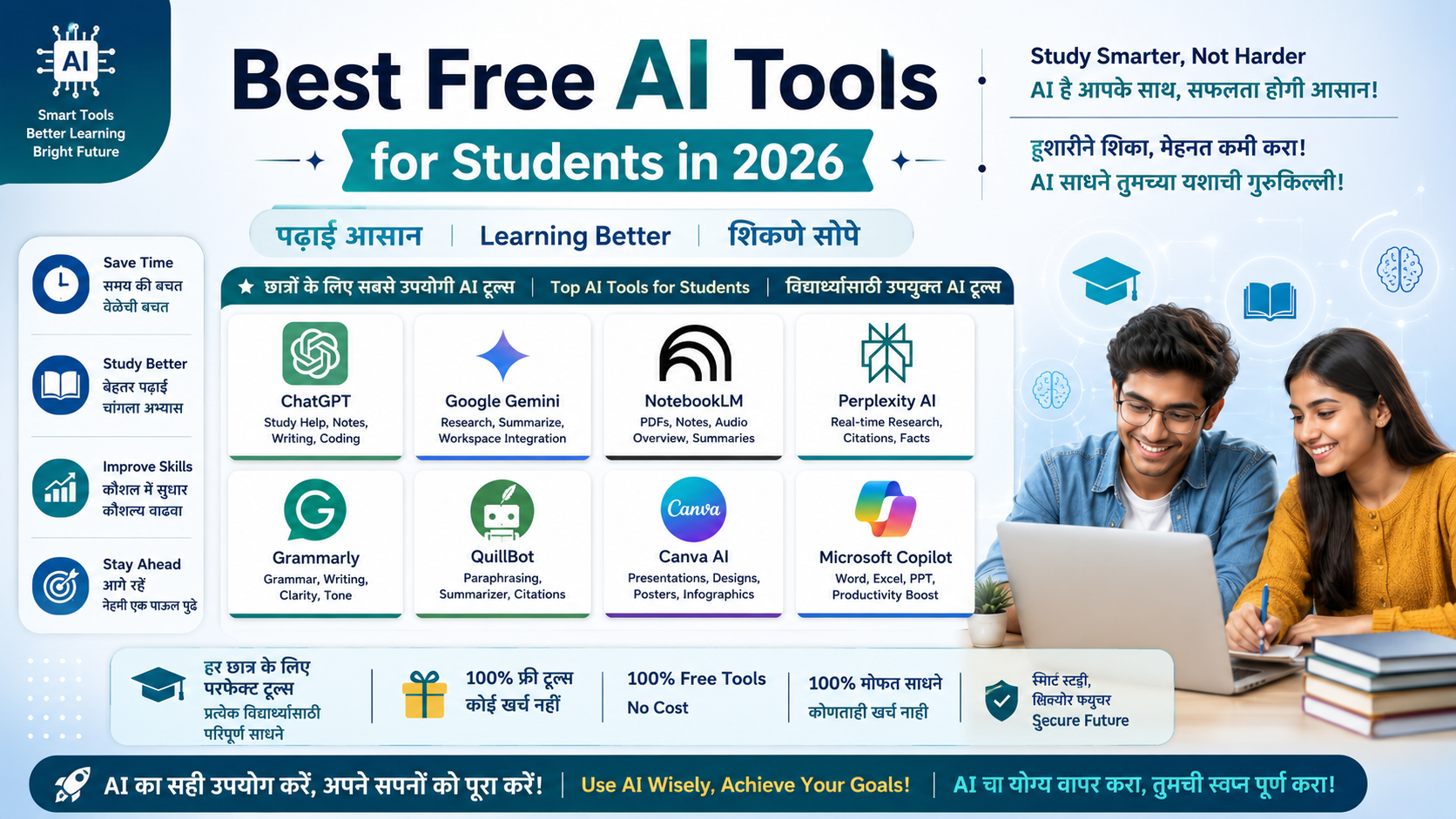
2026 मध्ये अभ्यास करणे पूर्वीपेक्षा वेगळे आहे. AI tools आता notes summarize करणे, essays लिहिणे, math सोडवणे, presentations बनवणे आणि research करणे — हे सर्व मिनिटांत करतात. आणि सर्वात महत्त्वाचे म्हणजे यापैकी बहुतेक tools पूर्णपणे मोफत आहेत. या लेखात आपण 8 verified free AI tools जाणून घेणार आहोत जे 2026 मध्ये प्रत्येक विद्यार्थ्याने वापरायला हवेत — एकही रुपया खर्च न करता.
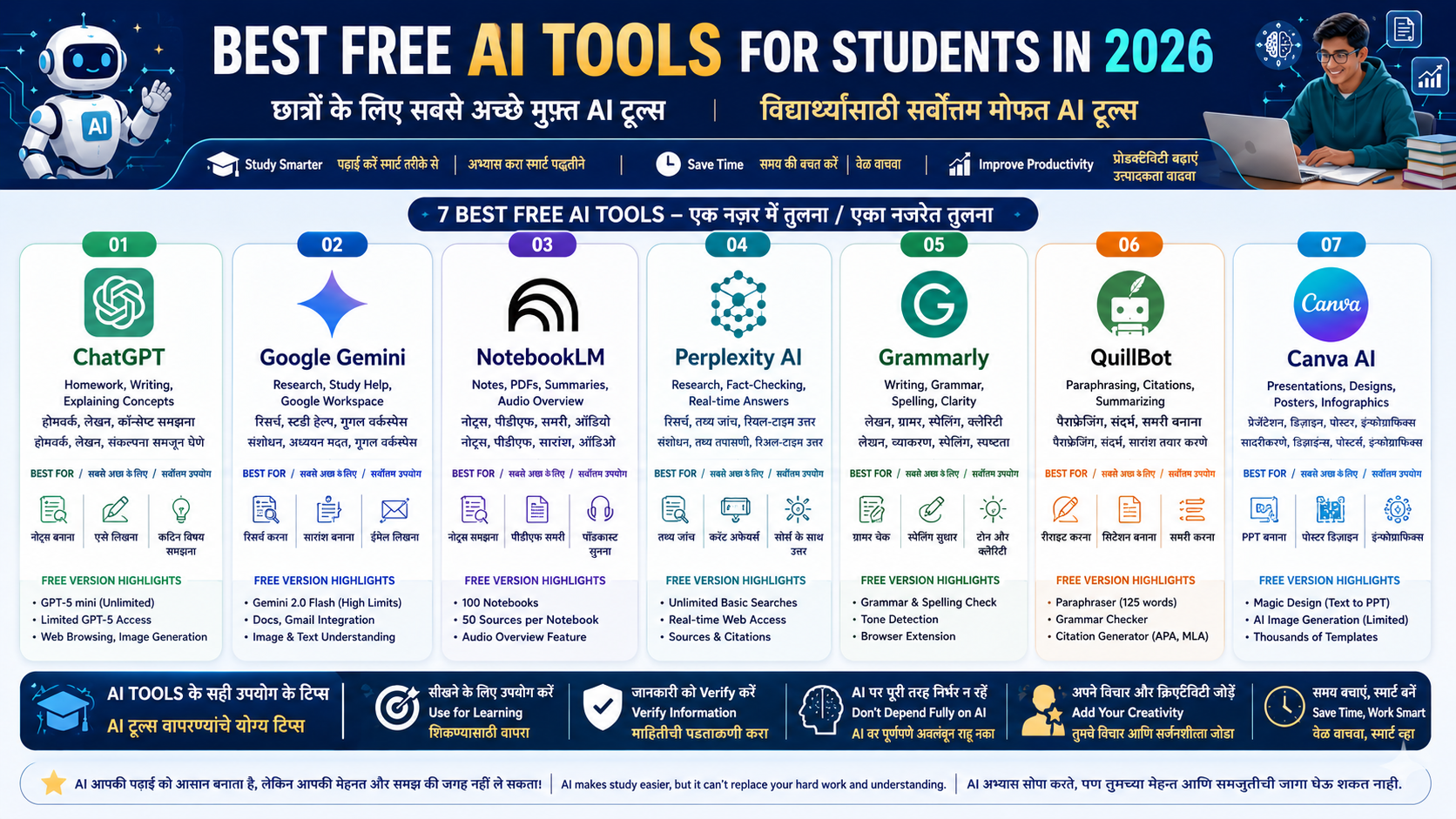
1. Google NotebookLM — notes आणि PDFs साठी सर्वोत्तम AI tool
Website: notebooklm.google.com | किंमत: पूर्णपणे मोफत
NotebookLM हे 2026 मधील विद्यार्थ्यांसाठी सर्वात underrated पण सर्वात powerful मोफत AI tool आहे. तुम्ही lecture notes, textbook PDFs, slides किंवा YouTube transcripts upload करता — आणि NotebookLM त्याच documents वर आधारित AI assistant बनतो. तो फक्त तुम्ही upload केलेल्या माहितीवरूनच उत्तर देतो, त्यामुळे चुकीच्या माहितीचा धोका नाही.
Free tier मध्ये काय मिळते:
100 notebooks, प्रत्येकात 50 sources, दररोज 50 chats
Audio Overview — तुमचे notes podcast सारखे ऐकता येतात commute मध्ये
PDFs, slides, websites आणि YouTube videos सर्व support
Best for: परीक्षेची तयारी, thesis research, dense textbook chapters summarize करणे
2. ChatGPT — सर्वाधिक वापरला जाणारा AI study assistant
Website: chat.openai.com | किंमत: Free tier उपलब्ध
ChatGPT 2026 मध्येही सर्वाधिक popular AI tool आहे. Free tier मध्ये unlimited GPT-5 mini access आणि limited GPT-5 access मिळतो. Homework explain करणे, essay draft करणे, कोणताही topic सोप्या भाषेत समजून घेणे — या सर्वांत ChatGPT उत्कृष्ट आहे.
Free tier मध्ये काय मिळते:
Unlimited GPT-5 mini access
Limited GPT-5 access दररोज
Basic voice mode
Web browsing आणि image generation (limited quota)
Best for: Homework help, essay writing, brainstorming, कोणत्याही topic ची explanation
Tip: College .edu email असल्यास ChatGPT Education plan check करा — मोफत किंवा सवलतीत access मिळू शकतो.
3. Google Gemini — सर्वात generous free AI model
Website: gemini.google.com | किंमत: मोफत
Google Gemini चा free tier 2026 मध्ये सर्वात generous आहे. Gemini 2.0 Flash ला खूप जास्त free usage limits आहेत. Google Docs, Gmail आणि Google Workspace सोबत integration smooth आहे.
Free tier मध्ये काय मिळते:
Gemini 2.0 Flash — खूप जास्त daily limits
Google Docs आणि Gmail मध्ये थेट वापर
Image understanding आणि multimodal tasks
Limited Deep Research feature
विद्यार्थ्यांसाठी: College .edu email असल्यास gemini.google/students वर student deal check करा.
Best for: Google Workspace users, research, multilingual tasks, reliable quick answers
4. Perplexity AI — research आणि fact-checking साठी
Website: perplexity.ai | किंमत: Free tier उपलब्ध
Perplexity AI एक AI-powered search engine आहे जे प्रत्येक उत्तरासोबत verified sources आणि citations देते. 10 tabs browse न करता तुम्ही थेट प्रश्न विचारा आणि cited answer मिळतो.
Free tier मध्ये काय मिळते:
Real-time web sources सह unlimited basic searches
प्रत्येक उत्तरासोबत citations
File upload (limited)
Multiple AI models चा access
Best for: Research papers साठी माहिती, current affairs, fact-checking, verified data शोधणे
5. Grammarly — writing आणि grammar सुधारण्यासाठी
Website: grammarly.com | किंमत: Free tier उपलब्ध | Browser extension
प्रत्येक विद्यार्थ्याला assignments, emails आणि applications मध्ये correct English लिहावी लागते. Grammarly चा free tier grammar, spelling, punctuation errors catch करतो आणि basic clarity suggestions देतो. Browser extension install केल्यावर Google Docs, Gmail आणि प्रत्येक website वर automatically काम करतो.
Free tier मध्ये काय मिळते:
Real-time grammar आणि spelling check
Tone detection
Basic clarity suggestions
सर्व websites वर काम करणारे browser extension
Best for: Essays, application letters, emails, academic writing — जिथेही English लिहायची असेल
6. QuillBot — paraphrasing आणि citations साठी
Website: quillbot.com | किंमत: Free tier उपलब्ध
QuillBot academic text paraphrase करण्यासाठी आणि citations automatically generate करण्यासाठी सर्वात popular tool आहे. Free tier मध्ये ~125 words per request limit आहे पण citation generator पूर्णपणे मोफत आहे.
Free tier मध्ये काय मिळते:
Paraphraser (~125 words per request)
Grammar checker
Citation generator — APA, MLA, Chicago format मध्ये
Basic summarizer
Best for: Research papers साठी references बनवणे, academic sentences rewrite करणे
महत्त्वाचे: QuillBot फक्त स्वतःच्या original writing मध्ये सुधारणा करण्यासाठी वापरा. AI-generated text paraphrase करून submit करणे academic dishonesty आहे.
7. Canva AI — presentations आणि design साठी
Website: canva.com | किंमत: Free tier उपलब्ध
20 मिनिटांत class presentation बनवायची असेल? Magic Design मध्ये topic type करा — polished presentation ready. Canva चा free tier templates आणि basic AI features साठी खूप generous आहे.
Free tier मध्ये काय मिळते:
Magic Design — text prompt वरून instant presentation
AI image generation (limited)
हजारो free templates
Infographics, posters, resumes
विद्यार्थ्यांसाठी: Canva Education plan colleges साठी मोफत आहे — तुमच्या college ला विचारा.
Best for: Class presentations, project infographics, posters, professional resume बनवणे
8. Microsoft Copilot — Word आणि Excel मध्ये मोफत AI
Website: copilot.microsoft.com | किंमत: Microsoft account सोबत मोफत
College मध्ये Microsoft 365 access असल्यास Copilot आधीच Word, PowerPoint आणि Excel मध्ये built-in आहे. Free Copilot Chat GPT-5 वर चालतो आणि बहुतेक students साठी effectively unlimited आहे.
Free tier मध्ये काय मिळते:
Copilot Chat — GPT-5 powered, effectively unlimited
Word मध्ये paragraph rewriting आणि document summary
Excel मध्ये data analysis आणि formula explanation
PowerPoint मध्ये AI-generated slides
DALL-E image generation
Best for: Microsoft 365 users, document writing, Excel assignments, presentations
कोणते tool कधी वापरावे — Quick Reference
काम | Best Tool |
|---|---|
Notes आणि PDFs summarize करणे | NotebookLM |
Homework concepts explain करणे | ChatGPT किंवा Gemini |
Research साठी verified facts शोधणे | Perplexity AI |
English writing improve करणे | Grammarly |
References आणि citations बनवणे | QuillBot |
Presentations आणि posters बनवणे | Canva AI |
Word आणि Excel मध्ये AI help | Microsoft Copilot |
2026 मधील मोफत AI tools इतके powerful आहेत की बहुतेक विद्यार्थ्यांना paid plan ची कधीच गरज पडणार नाही. NotebookLM आणि एक free chatbot — ChatGPT किंवा Gemini — या दोघांनी 80% अभ्यासाचे काम होते. आजच यापैकी एक tool निवडा, पुढच्या assignment वर try करा आणि तिथून पुढे जा.
वारंवार विचारले जाणारे प्रश्न
AI tools वापरणे म्हणजे cheating होते का?
नाही — जर योग्य पद्धतीने वापरले तर. AI tools tutor सारखे वापरा — concept समजण्यासाठी, notes organize करण्यासाठी आणि writing improve करण्यासाठी. AI ने लिहिलेले assignment स्वतःचे म्हणून submit करणे academic dishonesty आहे. प्रत्येक college चे स्वतःचे rules असतात — आधी check करा.
Indian students हे tools मराठी किंवा हिंदीत वापरू शकतात का?
होय. ChatGPT, Gemini आणि Perplexity तिन्ही मराठी आणि हिंदी प्रश्न समजतात आणि त्याच भाषेत उत्तर देतात. NotebookLM मराठी documents सोबत देखील काम करते. Grammarly आणि QuillBot मुख्यतः English साठी आहेत.
सुरुवात करणाऱ्याने कोणते tool आधी try करावे?
NotebookLM पासून सुरुवात करा. तुम्ही शिकत असलेल्या एखाद्या विषयाचे notes upload करा आणि teacher सारखे प्रश्न विचारा. यातून लगेच उपयुक्त experience मिळतो. त्यानंतर ChatGPT किंवा Gemini यापैकी एक general chatbot निवडा.
लेखक
Jayesh Gavit
IT इंजिनिअर आणि कंटेंट क्रिएटर, JGblogs
तंत्रज्ञान आणि नवीन गोष्टी तयार करण्याची आवड असलेले IT इंजिनिअर. 2026 मध्ये JGblogs सुरू केले — सरकारी योजना, नोकऱ्या आणि करिअर माहिती प्रत्येक भारतीयापर्यंत त्यांच्या भाषेत, मोफत पोहोचवण्यासाठी.
लेखकाबद्दल →लेख
संबंधित लेख
ChatGPT Features Explained: ChatGPT मधील प्रत्येक महत्त्वाच्या Tool ची संपूर्ण माहिती
७ ऑगस्ट, २०२६·1,250 views